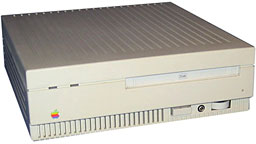
In the digital cosmos, the evolution of technology has been akin to the metamorphosis of a butterfly, shedding its chrysalis and revealing the splendor of innovation. However, some relics of the past remain deeply embedded within the tapestry of computing history, prompting a nostalgic inquiry: Can a vintage Mac SE use a CD-ROM? In this exploration, we will delve into the compatibility conundrum of this iconic machine and the enigmatic CD-ROM, traversing through technological timelines and uncovering the unique appeal of both.
The Vintage Mac SE: A Glimpse into History
The Macintosh SE, birthed in 1987, is an emblem of an era characterized by burgeoning personal computing. With its compact design and monochrome monitor, it attracted attention not only for its functionality but also for its aesthetic charm. It served as a bridge between the command-line past and the GUI-dominated future, featuring a 68000 series processor and a mere 1MB of RAM (expandable, of course) — a humble beginning in the grand narrative of technological advancement.
Its ability to revolutionize user experience resonates with the memory of pop-up books that open avenues to wondrous narratives. Thus, the question arises: can such a majestic artifact interact with the modern CD-ROM, an optical marvel that symbolizes the shift from storage constraints of floppy disks to the vast expanses of digital content?
The Rise of the CD-ROM: A Digital Renaissance
Emerging in the late 1980s, the CD-ROM was nothing short of a digital renaissance. It positioned itself as a cornerstone of multimedia, uniting data, sound, and imagery on a single shiny disc. With the capability to store 650MB of information, this format allowed software developers to encapsulate entire worlds within a circular disc, akin to time capsules from the future. The allure of CD-ROMs lay not only in their storage capacity but also in their accessibility, marking a departure from the constraints of the floppy disk era.
For the Mac SE, however, this intersection of timelines presents a formidable challenge. The Macintosh SE was not equipped with CD-ROM drives out of the box; they emerged as peripheral peripherals, akin to a blossoming flower unfurling in the sun. An external CD-ROM drive could indeed be utilized with the Mac SE, but the experience arises a labyrinth of compatibility issues and technological hurdles.
Interfacing Challenges: Bridging The Gap
The Mac SE interfaces primarily via SCSI (Small Computer System Interface), a protocol designed to connect devices in a chain-like fashion. Picture a bustling marketplace where vendors (devices) communicate with one another—this is SCSI in action. To harness the power of a CD-ROM on a Mac SE, one would need an external SCSI CD-ROM drive, a feat reminiscent of orchestrating a symphony with instruments from disparate eras.
However, the challenge does not lie solely in hardware compatibility. The software plays a critical role as well. Early operating systems for the Mac SE, notably System 6 and System 7, often required specialized drivers to recognize and interface with SCSI devices such as CD-ROM drives. These drivers serve as translators, converting coded intentions into a language the operating system can comprehend. Without them, the experience remains akin to gazing through a kaleidoscope without understanding the patterns within.
The Limitations: Performance and Usability
Even if one could surmount the technical challenges of connecting a CD-ROM to a Mac SE, performance limitations loom large. The hardware architecture, crafted during an era when multi-tasking was a prodigious ambition, encounters significant strain when faced with the demands of a CD-ROM. Reading data from these discs would likely introduce a bottleneck, akin to a river’s flow momentarily stymied by a stubborn boulder. Users may find the process cumbersome, confronting loading times reminiscent of a dial-up connection.
The allure of vast multimedia libraries and educational resources, while intoxicating, may thus transform into a quagmire of frustration. Users desiring seamless enjoyment of CD-ROM presentations, games, or software might need to embrace the patience of a scholar unraveling ancient scripts as they await loading times and troubleshooting prompts.
A Unique Appeal: The Beauty of the Unconventional
Yet, herein lies the paradox: the pursuit of utilizing a CD-ROM with a Mac SE transcends mere functionality and reaches deeper into the realm of charm. This endeavor embodies the spirit of collectors and enthusiasts who revel in the quirkiness of technology’s past. It draws individuals into a narrative that values legacy, cultivating a sense of nostalgia for an age when machines were less about speed and more about character.
Utilizing a CD-ROM with a Mac SE offers an opportunity to rediscover the joy of exploration, much like wandering through a forgotten library filled with tomes of an era long gone. Each interaction becomes a discovery, enriching the user experience with layers of history and creativity.
Conclusion: Navigating the Balance of Past and Future
In traversing the complexities of whether a Mac SE can utilize a CD-ROM, we encounter a fascinating microcosm of technology’s evolution. This journey reveals that while it is indeed possible to make this connection, it comes laden with limitations and a unique brand of charm. The Mac SE, a sentinel from a bygone era, engages in a delicate dance with the sprightly CD-ROM, reminding us that in the realm of technology, the heart often beats longer than the clock. Embracing what may seem archaic can enrich our understanding of our current digital landscape, inviting us to appreciate the past and its influence on the present and, indeed, the future. Each machine tells a story, a dialogue across time, borne by the digital river flowing ever onward.










Leave a Comment