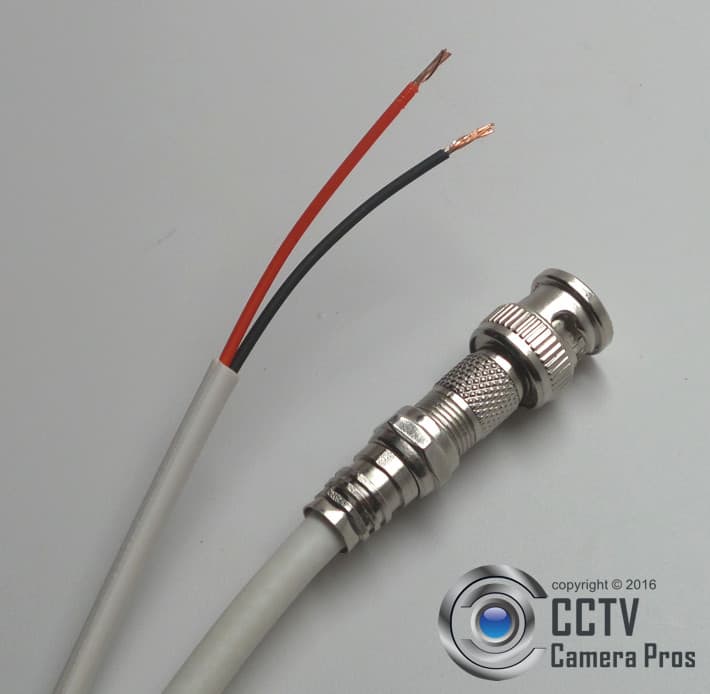
In the era of heightened security concerns, many homeowners and business operators have turned to surveillance systems for protection and peace of mind. One effective and relatively straightforward method for displaying camera feeds is via RCA cables connected to a television. By grasping the nuances of this connection, you not only enhance your viewing experience but also engender a sense of reassurance about your environment. Below, we delve into the specifics of connecting security cameras to your TV using RCA cables—transforming your approach to surveillance.
Understanding RCA Cables: The Basics
RCA (Radio Corporation of America) cables are a standard in the audiovisual realm, renowned for their ease of use and efficiency. Typically characterized by their color-coded connectors—yellow for video, red and white for audio—these cables transmit both sound and image. However, when it comes to security cameras, there are nuances to understand that can substantially improve your setup. Interactive components and compatibility with your existing television setup are at the forefront.
Choosing the Right Camera
Before delving into the technical details, the first step is selecting the appropriate security camera. Not all cameras are designed to interface seamlessly with televisions via RCA connection. Opt for a camera that explicitly states compatibility with RCA outputs. Moreover, consider the type of camera. Options range from traditional analog cameras to modern digital varieties. Analog cameras often utilize RCA connections directly, while digital cameras may require additional adapters to accomplish this integration.
Gathering Required Tools and Components
The installation process demands a few essential tools and components to ensure smooth execution:
- RCA Cables: Ensure you have a sufficient length to run from the camera to the television.
- Power Supply: Confirm that your camera has a stable power source. This may involve using a power adapter that fits the camera’s specifications.
- TV with RCA Inputs: Most televisions have yellow, red, and white inputs, typically located on the back or side panel.
- Optional Splitters: If you intend to connect multiple cameras, consider RCA splitters to manage the connections.
Connecting the Camera to the Television
Once you have prepared your tools and selected your camera, it’s time to establish the connection. Follow these straightforward instructions for a seamless setup:
- Position the Camera: Choose a strategic location for your camera. The positioning should cover the desired area while allowing easy access to the RCA connections.
- Connect the RCA Cables: Attach one end of the RCA cables to the camera. Ensure the yellow cable connects to the video output and the red and white cables connect to the audio output if applicable.
- Attach to the TV: Insert the opposite end of the RCA cables into the corresponding RCA inputs on your television. Match the colors—yellow with yellow, red with red, white with white.
- Power Up: Ensure your camera is powered using the appropriate supply. This is vital for displaying the feed on your TV.
- Select the Input Source: On your TV remote, navigate to the input selection or source button. Select the RCA input you have connected to, often named ‘AV’, ‘Composite’, or similar.
Troubleshooting Common Issues
Post-connection, there may be hiccups encountered along the way. Understanding common issues is paramount for quick problem-solving:
- No Signal: If the TV shows a ‘No Signal’ message, double-check the cable connections and input source.
- Poor Video Quality: Blurred or pixelated images can arise from faulty cables or poor camera placement. Re-evaluate the connections and camera angle.
- Audio Failure: If image quality is clear but audio is absent, ensure the audio cables are properly connected and that the TV settings permit audio output from the RCA source.
Enhancing Your Setup
Upon successfully connecting your security camera to your television, consider enhancing your setup. A few suggestions include:
- Integrating Multiple Cameras: If security is a primary concern, consider using multiple cameras connected through a single TV. Utilize splitters to manage multiple feeds efficiently.
- Adjusting Camera Settings: Many cameras provide options to modify settings such as resolution, frame rate, and monitoring modes. Familiarize yourself with these features to tailor the surveillance experience.
- Employing Recording Solutions: To archive footage, contemplate additional devices such as DVR systems compatible with your setup, ensuring you have a record of surveillance events.
Conclusion: Embracing Security and Control
Connecting a security camera to your television using RCA cables may appear simplistic, but the implications are profound. This integration not only provides live monitoring capabilities but also fosters a sense of security, allowing you to observe your surroundings with ease. As you engage in this process, consider the broader narrative of control and vigilance it encompasses. By mastering the art of connectivity, you take a proactive stance in safeguarding your environment while simultaneously enhancing your understanding of modern technology. Embrace this newfound perspective and transform your approach to home and business security.








Leave a Comment