In today’s digital world, social media has become a significant platform for sharing ideas, experiences, and, of course, photos and videos. Among the myriad platforms available, Instagram shines brightly, captivating millions with its visually rich interface. As a content creator, you might often find yourself wondering who is sharing your posts. Understanding this could not only enhance your engagement strategies but also give you insights into your audience. Here’s a comprehensive guide on how to see who shared your Instagram post.
1. Understanding the Mechanics of Sharing
Before delving into methods, it is essential to grasp the intricate mechanics behind sharing on Instagram. When users share your post, they can do so either through Direct Messages (DMs) or by adding your post to their own stories. The nature of sharing directly influences how you can track this activity.
2. Utilizing Instagram Insights
For those who maintain a business or creator account, Instagram Insights is an invaluable tool. To access this feature, you must first switch to a professional account if you haven’t done so already. Once you have access:
- Navigate to Your Profile: Go to your Instagram profile and select the post you wish to analyze.
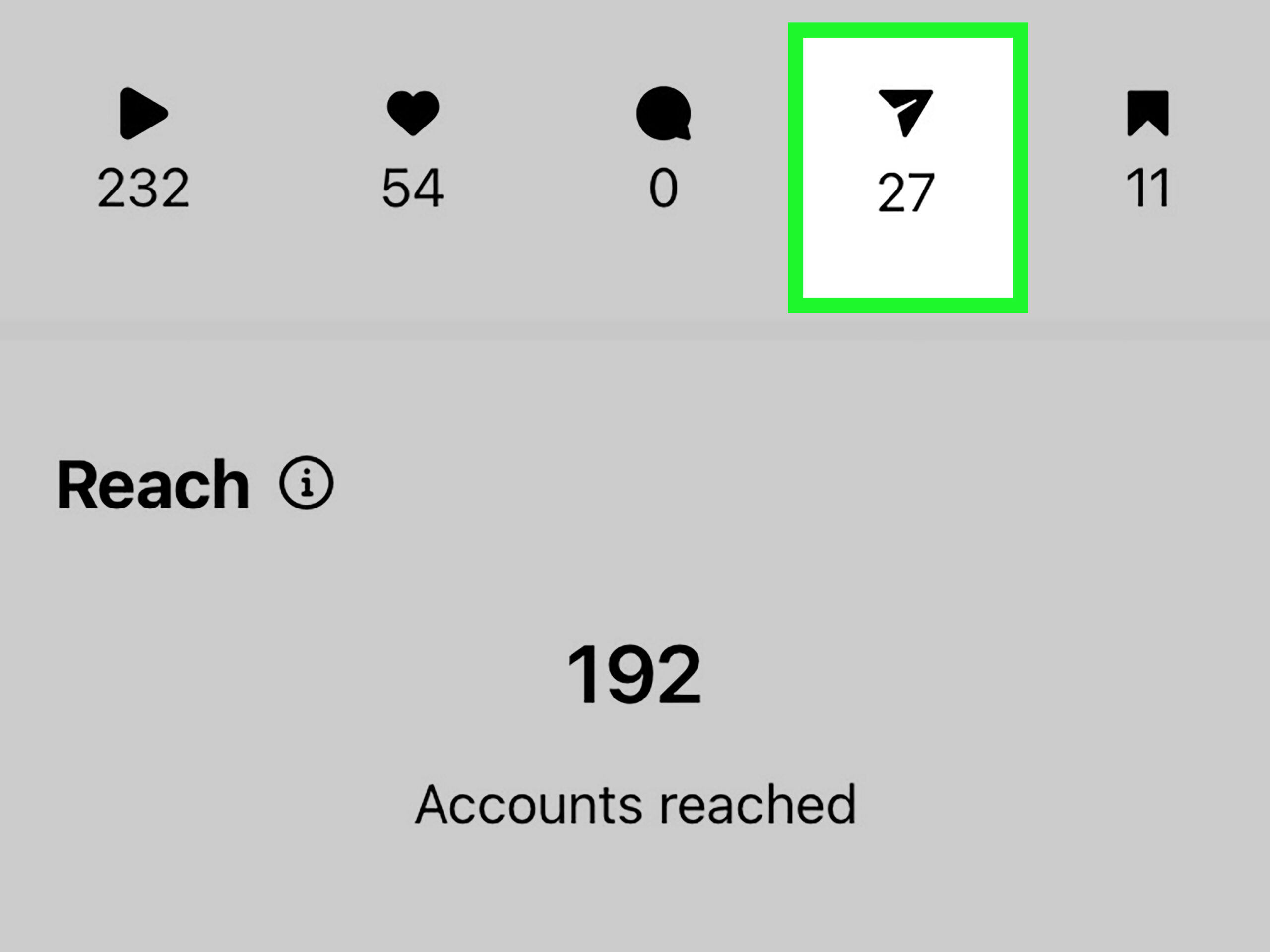
- Access Insights: Tap on the “View Insights” option located below your post. Here, you will find an array of statistics including likes, comments, saves, and shares.
- Interpreting Shares: While Insights won’t reveal the exact users who shared your post, it will indicate the total number of shares. This can give you a clarity of your post’s virality.
3. Tracking Story Shares
Stories provide a more dynamic way for users to engage with your posts. If your photos or videos are showcased in someone’s story, you can gain insights by:
- Checking Story Mentions: If someone tags you in their story when they share your post, you’ll receive a notification. It’s crucial to keep an eye on these notifications as they indicate direct engagement.
- Interactive Polls and Tags: Encourage sharing by adding polls or tags in your story posts. This can foster a sense of community and increase the likelihood of your posts being shared.
4. The Power of Engagement
Another indirect method to gauge who has shared your content is by encouraging engagement through comments and likes. A post that gathers considerable attention might spark conversations that lead to shares. Utilize tactics such as:
- Asking Open-Ended Questions: In your captions, include questions that invite dialogue. This creates a space where users feel compelled to engage more, thus increasing the chances of sharing.
- Hosting Contests: Generate excitement through contests that require users to share your post to participate. Make sure to specify the rules clearly to amplify shareability.
5. Third-Party Analytics Tools
If you seek a more in-depth analysis, consider employing third-party analytics tools. These platforms transcend the basic metrics provided by Instagram Insights. Some notable mentions include:
- Later: It allows you to track engagement, including the shares of your posts, offering comprehensive reports.
- Hootsuite: As a social media management tool, it provides insights on user interactions, shares, and overall engagement across multiple platforms.
However, tread carefully as some third-party tools might not be officially sanctioned by Instagram, potentially leading to privacy issues. Always prioritize user safety and compliance.
6. Analyze Your Community
Understanding your audience is paramount in deciphering who shares your posts. Regularly analyze your followers and the types of content they resonate with. This can be achieved through:
- Demographic Insights: Utilize the analytics section to comprehend the age, location, and preferences of your viewers. Tailoring future content based on this information increases share likelihood.
- Content Trials: Experiment with different styles and themes. For instance, if a particular type of post garners more shares, consider creating a series based on that theme.
7. Feedback Loop
Lastly, engage directly with your audience. Create a feedback loop by asking your followers what kind of content they wish to see shared. Utilize polls in your stories or features like Question Stickers. This candid dialogue can unveil startling insights into what excites your audience, allowing you to produce sharable content.
Conclusion
Understanding who shares your Instagram posts might not be straightforward, but by employing these strategies, you can gather invaluable data on your audience and optimize your content creation process. From harnessing Instagram Insights and third-party tools to fostering community engagement, each approach provides a unique lens through which to view your content’s impact. Utilize these insights not just to track shares but to pave the way for vibrant interactions and sustained growth on your Instagram profile. Embrace the art of storytelling through your visuals, and watch as your posts resonate further and deeper within your community.









Leave a Comment