In an ever-evolving digital landscape, platforms for sharing artwork, literature, and various forms of creative expression have proliferated. DeviantArt, one of the largest online communities for artists and art enthusiasts, offers a space where creators can showcase their work and interact with peers. However, like any online platform, it may host accounts or content that can be inappropriate or undesired. Whether it’s due to offensive material, spam, or simply a person whose content does not resonate with you, the ability to block accounts is essential for a tailored and enjoyable experience on the platform. This article provides a detailed guide on how to effectively block DeviantArt accounts, ensuring a more curated environment for your creative exploration.
Understanding the Need to Block Accounts
Blocking accounts on DeviantArt can be motivated by several reasons. Some users may encounter individuals who engage in harassment or display toxic behavior, which can detract from the supportive community that many seek. Others may wish to filter out content that does not align with their artistic preferences or ethical standards. Recognizing these motivations is the first step towards a harmonious experience on this platform, where personal comfort and artistic inspiration coexist.
Identifying Accounts to Block
Before diving into the blocking procedure, it’s crucial to identify the accounts that warrant this action. Watch for signs of inappropriate behavior, such as:
- Harassment: If an account engages in hostile interactions, whether directed towards you or others, it may be time to consider blocking.
- Spam and Ads: Accounts that continuously post unsolicited advertisements or irrelevant content can detract from the quality of your feed.
- Offensive Content: Any artwork or comments that perpetuate hate speech, explicit material, or bullying should not be tolerated.
Once you have determined which accounts affect your experience negatively, you can proceed to the blocking process.
Steps to Block an Account on DeviantArt
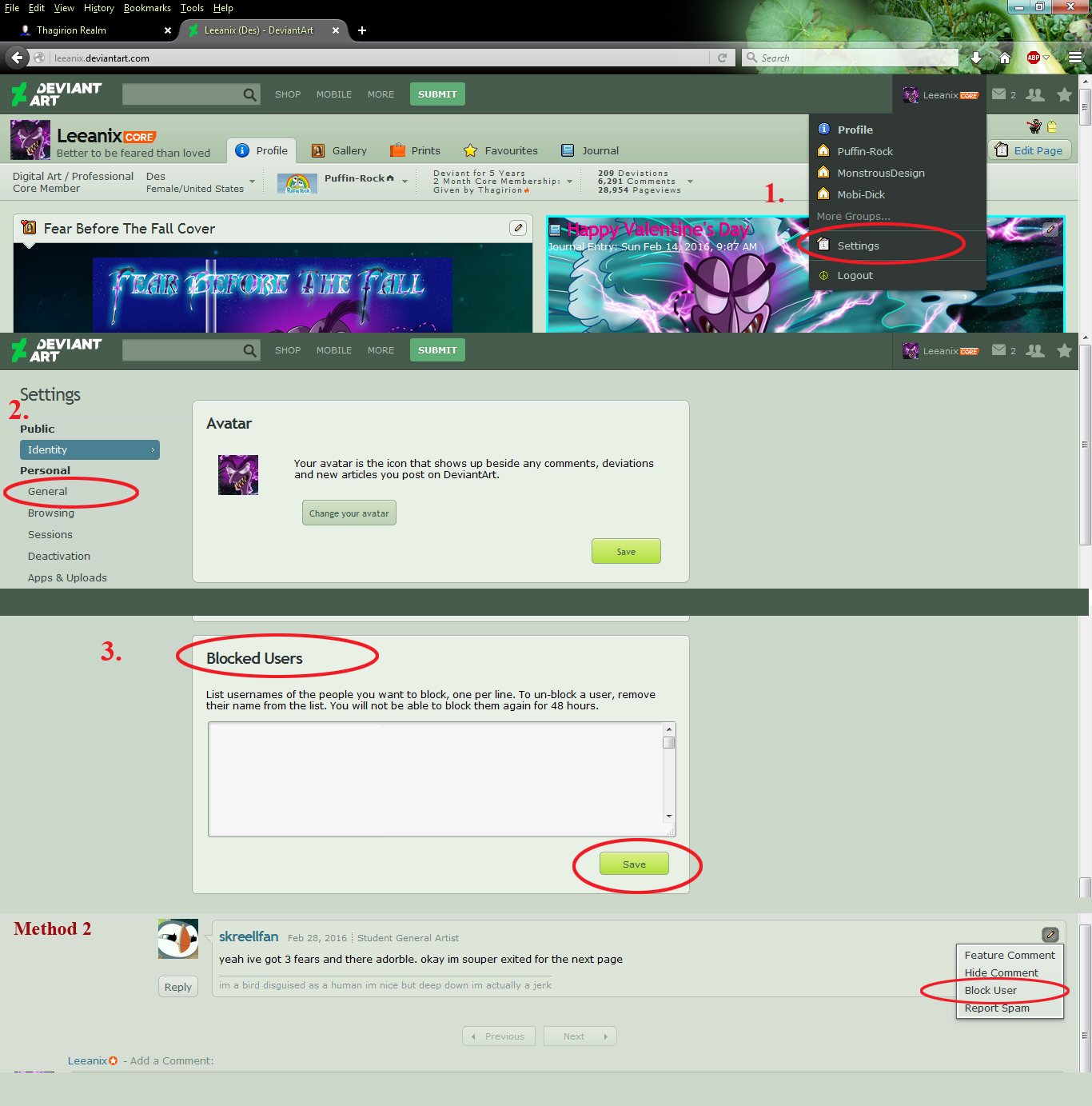
Blocking an account is a straightforward process. Here’s a step-by-step guide:
- Log into Your Account: Start by logging into your DeviantArt account. Access your homepage by clicking the DeviantArt logo in the upper left corner.
- Locate the Account: Use the search bar at the top of the page to find the account you wish to block. You can type in their username or browse through your messages or comments to locate their profile.
- Access Their Profile: Once you find the individual’s account, click on their username to navigate to their profile page.
- Initiate the Block: On the profile page, look for the options menu, usually represented by three dots or settings gear icon. Click on this menu to reveal more options, and select “Block User.”
- Confirm the Action: A prompt will appear asking you to confirm that you want to block this user. Review the message and confirm your decision. Successful blocking will prevent them from commenting on your work or accessing your profile.
Post-Blocking Actions
After successfully blocking an account, several follow-up actions can enhance your experience further:
- Manage Your Block List: DeviantArt allows you to review and manage your blocked accounts through your account settings. Regularly check this list to ensure it reflects your current preferences.
- Report Inappropriate Behavior: If you encounter harassment or violations of community guidelines prior to blocking, consider reporting the account to DeviantArt’s moderation team. Reporting can help maintain community standards and protect other users.
- Engage with Supportive Users: Focus on nurturing connections with artists and users who uplift and inspire you. Engage positively with peers who share your artistic interests to foster a healthy online atmosphere.
Potential Challenges and Solutions
Blocking accounts can sometimes lead to unforeseen issues. For instance, blocking someone may escalate their negative behavior. In such cases, remember:
- Set Your Profile Settings: Adjust privacy settings on your profile to limit who can interact with you. This can serve as an additional precautionary measure.
- Engaging the Community: If you feel overwhelmed, consult forums or community groups for advice and support. Understanding how others navigate similar challenges can provide valuable insights.
Conclusion
Curating your experience on DeviantArt involves understanding your needs and taking actionable steps to uphold a positive environment. Blocking accounts that spread negativity or unwanted content is a fundamental aspect of safeguarding your online space. By following the practical steps outlined in this guide, users can maintain a comfortable atmosphere tailored to their artistic pursuits. In the end, the goal is to create a haven where creativity can flourish unencumbered by discord and strife. Your artistic journey deserves an environment that inspires and uplifts.






Leave a Comment