If you’ve ever found yourself in a predicament, standing outside your Hyundai with a key fob that simply won’t work, you may wonder: how often should I replace the battery in my Hyundai key fob? Picture this: it’s a rainy day, you’re running late, and as you reach for your key fob, the dreaded realization strikes—your remote is unresponsive. What a conundrum! In this article, we delve deeply into the ins and outs of Hyundai key fob batteries, exploring their significance, maintenance, and when to take action.
Understanding the Role of the Key Fob
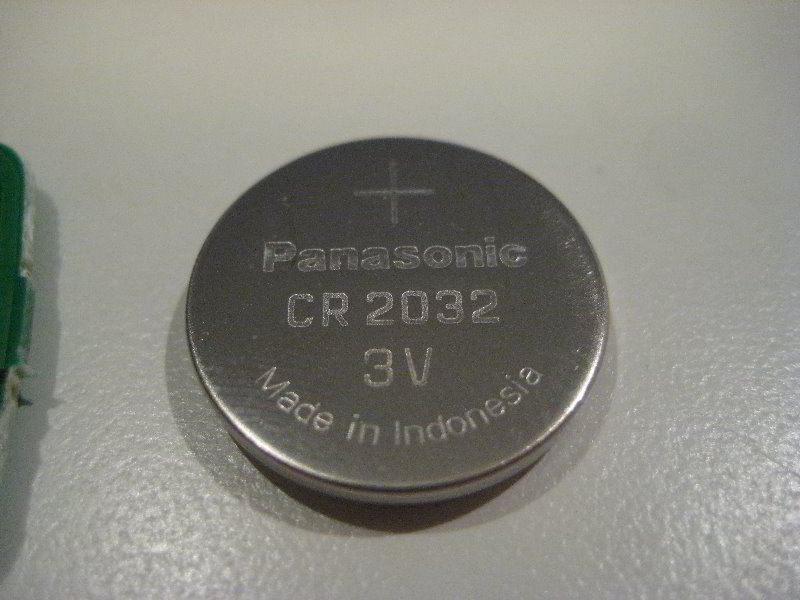
The key fob is more than just a remote control; it serves as the gateway to your vehicle. Key fobs facilitate functions such as locking and unlocking doors, starting the engine, and activating the vehicle’s alarm system. This miniature device combines intricate electronics with a power source—its battery. Most Hyundai key fobs utilize a coin-cell battery, typically CR2032, known for its reliability and compactness.
Identifying Symptoms of a Failing Battery
Batteries don’t last forever, and the key fob is no exception. Recognizing the signs of a waning battery is crucial to prevent unexpected mishaps. Here are common symptoms that indicate it might be time to replace your key fob battery:
- Decreased Range: Struggling to unlock your vehicle from a distance may suggest that the battery is losing its potency.
- Intermittent Functionality: Your key fob works sporadically, responding only occasionally to your commands.
- Multiple Clicks Required: If you find yourself pressing the button multiple times to execute a command, the battery may be on its last legs.
- Dim Dashboard Light: Some key fobs feature an LED indicator that dims as the battery weakens.
How Long Does a Key Fob Battery Last?
The lifespan of a key fob battery typically ranges from two to four years, depending on usage and environmental factors. Frequent use, extreme temperatures, and poor storage can all affect battery longevity. In regions with drastic temperature fluctuations, batteries can deplete more quickly, so keeping your key fob in a temperate environment is advisable.
Steps to Replace Your Hyundai Key Fob Battery
While it may seem daunting, replacing a key fob battery is often a straightforward process. Here’s a step-by-step guide:
- Gather Your Tools: All you need is a small flathead screwdriver and a new battery (likely a CR2032).
- Open the Key Fob: Use the screwdriver to gently pry apart the two halves of the fob, being cautious to avoid damaging any clips or internal components.
- Remove the Old Battery: Take note of how the old battery is positioned (usually with the positive side facing up) and remove it carefully.
- Insert the New Battery: Place the new battery into the compartment, ensuring that it mirrors the orientation of the old battery.
- Reassemble the Key Fob: Snap the two halves back together, ensuring a snug fit.
- Test Your Key Fob: Stand a few feet away from your vehicle and test the functions of the fob to ensure that it is operating correctly.
When to Consult a Professional
Though most individuals can comfortably replace their key fob battery, there are circumstances that might warrant professional assistance. If your fob consistently fails to work after replacing the battery, or if you suspect internal damage, visiting a Hyundai dealership or an automotive locksmith may be necessary. These professionals can diagnose more complex issues such as malfunctioning wiring or internal circuitry problems.
Cost Considerations
The financial aspect of replacing a Hyundai key fob battery is relatively minimal. A replacement battery typically costs between $3 to $10 at most retailers. However, if you encounter issues that require professional intervention, the costs can escalate. Testing and reprogramming services may range from $50 to $100, depending on your location and service provider.
Tips for Longevity
Enhancing the lifespan of your key fob battery is not just about timely replacements; it’s also about maintenance. Here are a few pragmatic tips:
- Avoid Extreme Conditions: Don’t leave your key fob exposed to direct sunlight or severe cold, as these conditions can contribute to battery drainage.
- Limit Physical Strain: Avoid placing heavy objects or stress on your key fob, as this can damage internal components.
- Regular Checks: Take a moment to test your fob periodically, especially before long trips, to ensure reliable functioning.
In conclusion, handling the challenge of a non-functioning Hyundai key fob battery doesn’t have to be a hassle. By recognizing the signs of a failing battery, understanding the replacement process, and knowing when to seek professional help, you can ensure that your vehicle remains accessible. So, the next time you find yourself fumbling with your remote, you’ll be equipped with the knowledge to tackle the situation head-on! Remember to check the battery regularly and enjoy the seamless convenience your Hyundai has to offer.









Leave a Comment