
Short Answer
Every recreational sailor should know how to confirm that a VHF marine radio is working before leaving the dock. A radio check is a simple transmission test, but it can easily become a source of harmful interference if done on Channel 16, at high power, or without listening first. The U.S. Coast Guard and national maritime authorities consistently warn that Channel 16 is reserved for distress, safety, and calling only. Performing a radio check there is not only poor seamanship but can delay or obscure a genuine mayday. This guide explains how to perform a VHF radio check without causing interference, using open working channels, low power settings, and the DSC test call feature where available.
Main Explanation
What It Is
A VHF radio check without causing interference is a structured procedure for verifying that a marine VHF radio can transmit and receive on the correct frequencies while minimizing disruption to other users. In the context of independent sailing reference and tools platforms, this procedure is not tied to any specific boat brand, sailing school, or equipment manufacturer. It is a universal seamanship practice based on published guidance from coast guard authorities and marine communication standards. The core purpose is to give a sailor confidence that the radio will work in an emergency, without creating unnecessary radio traffic or blocking channels used for distress and safety.
Why It Matters
Marine VHF channels are a shared public resource. Channel 16 is monitored by the U.S. Coast Guard and other rescue authorities, and it must remain clear for distress calls, urgent safety traffic, and initial contact. A radio check on Channel 16 can mask a weak mayday from a vessel in trouble. Beyond the legal and ethical issues, sailors face practical challenges: conflicting advice on which channels to use, outdated references that still list discontinued automated check systems, and information overload from forums and social media. The Sea Tow Automated Radio Check System, which once operated on VHF channels 24 and 28 in over 130 locations, was discontinued on October 2, 2020, according to the U.S. Coast Guard Navigation Center. Relying on outdated advice can lead a sailor to transmit on a channel that is no longer monitored or, worse, to use Channel 16 out of habit. A clear, independent procedure removes that confusion.
How It Works
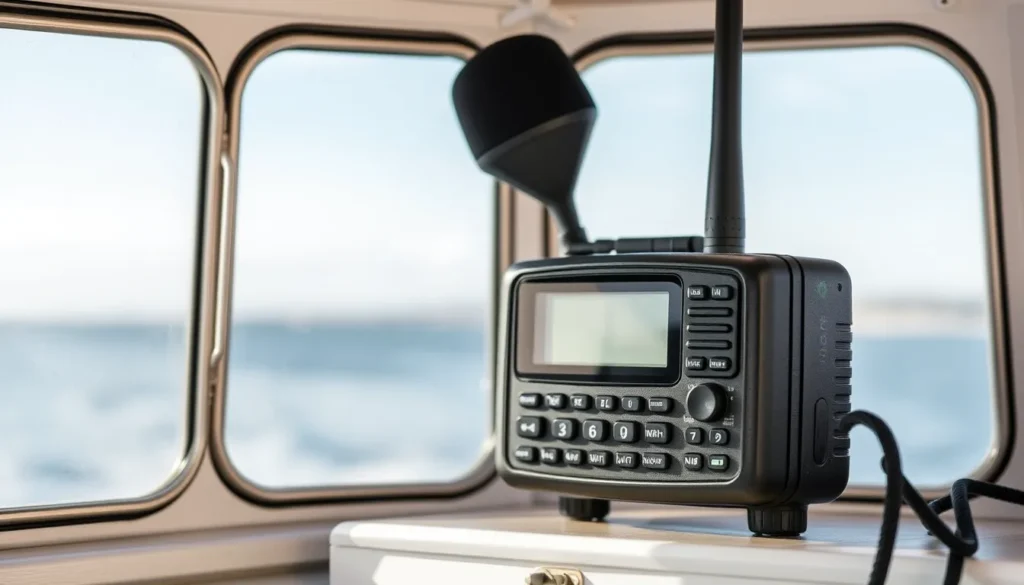
The procedure has two main paths: a voice check on a designated open working channel, and a digital selective calling (DSC) test call on Channel 70. For voice checks, the Federal Communications Commission and Coast Guard recommend using open channels such as 68, 69, 71, 72, and 78A. These are non-commercial working channels where brief test transmissions are acceptable in many areas, but you must always listen first to confirm the channel is not in use. Set the radio to low power, typically one watt, to limit range and reduce the chance of interfering with distant stations. Key the microphone and say ‘radio check’ three times, followed by your boat name and location. Then release the microphone and wait for a reply. A response from another vessel or a shore station confirms that your transmitter and receiver are working.
For DSC-equipped radios, the U.S. Coast Guard offers an automated DSC test call capability from each Rescue 21 coastal station on VHF Channel 70, which is 156.525 MHz. All fixed-mount marine radios certified by the FCC since 1999 are required to have DSC capability, and radios sold since 2011 must also have a DSC test call feature. To use it, select the DSC test call function on your radio, enter the Coast Guard station’s Maritime Mobile Service Identity if required, and transmit. A successful acknowledgement confirms that the digital portion of your radio is functioning. According to the Coast Guard, a radio that transmits and receives a DSC test call can be expected to operate acceptably in voice mode as well.
How to Do It
Here is a practical walkthrough for a typical coastal passage scenario. Before casting off, turn on the VHF radio and adjust the squelch until the background static just stops. Tune to Channel 16 briefly to confirm you can hear normal traffic, but do not transmit there. Then switch to an open working channel such as 68 or 72. Press the low power button if your radio has one, or select the one-watt setting. Listen for at least 30 seconds to make sure the channel is clear. Key the microphone, speak clearly, and say: ‘Radio check, radio check, radio check. This is [boat name] at [location].’ Release the key and wait. If no one replies after 30 seconds, try another open channel or move to a different location. If you have a DSC radio, perform a DSC test call to the nearest Coast Guard Rescue 21 station on Channel 70. This does not require voice transmission and is often the cleanest way to verify both digital and voice functionality. Record the result in your log.
When Not to Do It
Do not perform a voice radio check on Channel 16 under any circumstances. Do not use high power for a routine check, because it can reach stations many miles away and cause unnecessary interference. Do not rely solely on a radio check to confirm that your entire communication system is working; a radio check only verifies the radio itself, not the antenna installation, coaxial cable, or power supply under load. If you suspect a fault, have the installation inspected by a qualified marine electronics technician. Do not use a DSC test call if your radio’s MMSI is not programmed or if you are unsure of the procedure, because an incorrect DSC transmission can generate a false alert. Finally, do not perform repeated radio checks in a busy harbor or anchorage; one successful check is sufficient.
Visual
- Turn on the VHF radio and adjust squelch until static stops.
- Tune to Channel 16 and listen briefly to confirm normal traffic, but do not transmit.
- Switch to an open working channel such as 68, 69, 71, 72, or 78A.
- Set the radio to low power, typically one watt.
- Listen for at least 30 seconds to ensure the channel is clear.
- Key the microphone and say: ‘Radio check, radio check, radio check. This is [boat name] at [location].’
- Release the key and wait for a reply.
- If no reply, try another open channel or perform a DSC test call on Channel 70.
- Log the result and note any anomalies for further inspection.
Common Mistakes
Using Channel 16 for a radio check
Channel 16 is reserved for distress, safety, and calling. Transmitting a radio check there can block a mayday and is a violation of maritime radio regulations. Always use an open working channel for voice checks.
Transmitting at high power
High power extends your signal far beyond the immediate area, increasing the chance of interfering with other vessels and shore stations. Use low power, typically one watt, for a routine check.
Not listening before transmitting
Keying the microphone without listening can interrupt an ongoing conversation or an emergency call. Always monitor the channel for at least 30 seconds before transmitting.
Ignoring the DSC test call feature
Many sailors perform only a voice check and never test the DSC function. A DSC test call to a Coast Guard Rescue 21 station on Channel 70 verifies the digital distress capability, which is critical in an emergency. Radios sold since 2011 must have this feature.
Assuming a voice check confirms the entire radio system
A successful voice check only proves that the radio can transmit and receive at that moment. It does not verify antenna performance, cable integrity, or battery voltage under load. If you have any doubt, have the system inspected by a marine electronics technician.
Repeating radio checks unnecessarily
Performing multiple radio checks in a short period clutters the channel and annoys other users. One successful check is enough. If you need to test again, wait until you are in a different location or after a significant change in conditions.
Safety Note
A VHF radio check is a small but important part of a broader safety framework. Digital tools and reference platforms can guide you, but they never replace proper training, physical checks, and human judgment. Always cross-check critical navigation and weather data with official sources such as national weather services, tide tables, and coast guard broadcasts. Never use a tablet or phone as your only navigation or communication tool; a dedicated marine VHF radio with a charged battery is essential. Keep paper charts and a handheld VHF as backups. Take a certified marine radio operator course and a safety at sea course. Follow the International Regulations for Preventing Collisions at Sea and local maritime regulations at all times. If you are unsure whether your radio is working correctly, do not leave the dock until it has been inspected by a qualified technician.
FAQ
Can I use Channel 16 for a radio check if I keep it very short?
No. Channel 16 is reserved for distress, safety, and calling. Even a brief radio check can interfere with a mayday. Use open working channels such as 68, 69, 71, 72, or 78A, and set your radio to low power.
What should I do if no one answers my voice radio check?
First, try another open working channel. If you still get no response, perform a DSC test call to the nearest Coast Guard Rescue 21 station on Channel 70 if your radio supports it. If that also fails, have your radio and antenna system inspected before leaving the dock.
Is the Sea Tow Automated Radio Check still available?
No. The Sea Tow Automated Radio Check System was discontinued on October 2, 2020. Do not rely on channels 24 or 28 for automated checks. Use the Coast Guard DSC test call or a voice check on an open working channel instead.
Does a successful voice radio check mean my DSC distress function works?
Not necessarily. A voice check only verifies the analog transmit and receive path. To test the DSC function, use the DSC test call feature on Channel 70 to a Coast Guard Rescue 21 station. A successful acknowledgement confirms the digital distress capability.










Leave a Reply